
Self-Hosted Posthog in 2026: Installation, Costs and Pitfalls


You have a web app. People sign up, click around… But then they vanish for reasons known only to them (and possibly their cats). Which features do they prefer? Where do they give up? Do you need a complete rehaul, or are you just supposed to move the “Order” button? Answering that usually takes some analytics tools, a session recorder, and possibly a spreadsheet, all held together by hope.
PostHog promises to transform the whole zoo of tools into a single dashboard. And for the person looking at it, it works. But for the person deploying it, it’s a mess of heterogeneous components, each one a small challenge of its own.
In this article we’ll install PostHog on 3HCloud VM and walk you through the errors the system throws your way in an attempt to lead you astray.
A Few Notes on Pricing
One thing that makes PostHog special is that it has neither a subscription fee nor per-user pricing. There are only two options: the free plan and pay-as-you-go.
The difference between the two, broadly speaking, isn’t too significant. The free plan gives you 1 project and 1 year of data retention. On the other hand, you get 6 projects and 7 years of retention with the paid option. The support level also differs, as direct email requests are unavailable on the free tier.
As for billing, it’s important to note that each product has its own counter and unit of measurement:
Limits are shown as of the time of writing (September 2026)
The interesting part is that the limits are cumulative, which means that small projects can remain on the free tier for years. For instance, a small application can easily run analytics, collect errors, roll out features through flags, run surveys, and still stay well within the limits.
But once you exceed them, the same cumulative model starts working against you. For tools billed by monthly tracked users, the bill starts growing steadily as usage increases. The pricing ramps up for each product. Sure, there are discounts as volume grows, but this also complicates calculations. There are several pricing structures, and they all work independently:
Pricing is shown as of the time of writing (September 2026).
Now imagine if we created a profile for a specific user. This would immediately change the pricing “ladder”, and identified events would cost almost 4 times more after the first 1M events. Add autocapture for every one of them, and this multiplier can quickly turn the expected $50 into several hundred.
Group analytics for B2B scenarios and data pipelines for exporting data externally work in a similar way.
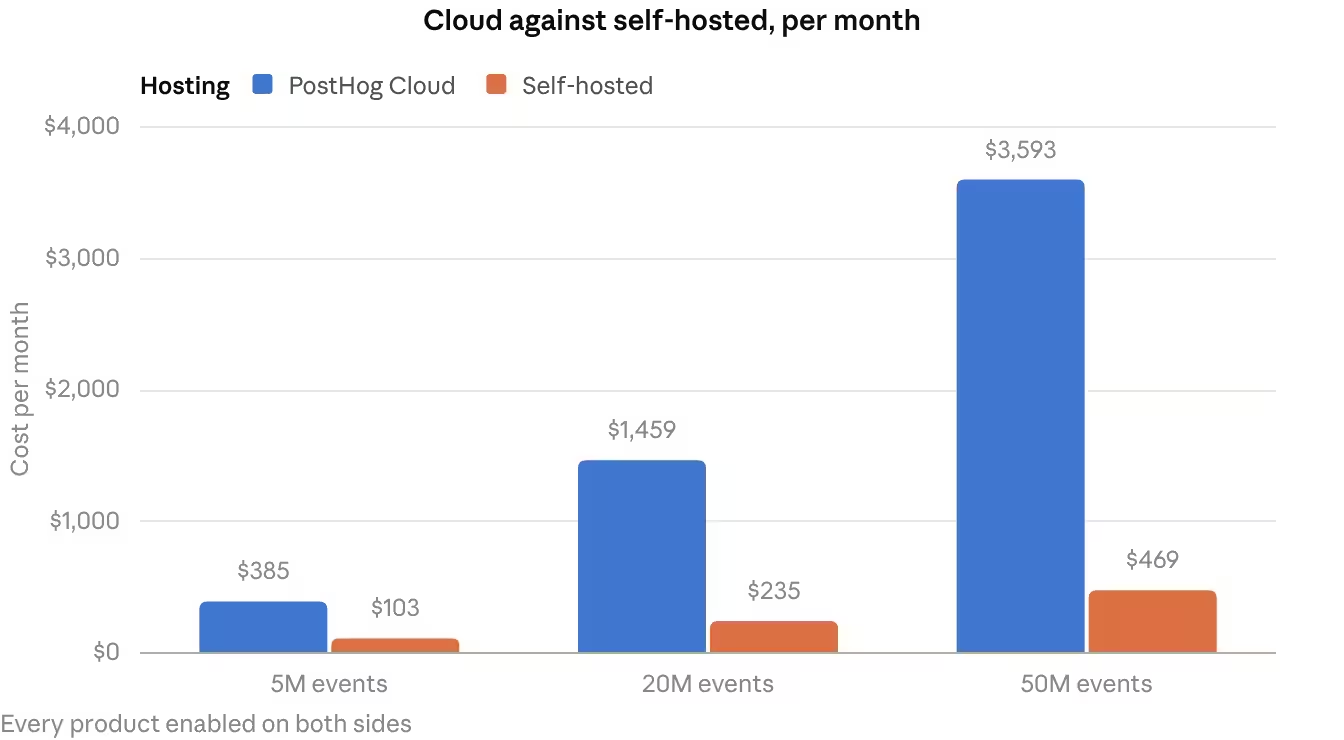
If we take three companies of different sizes, enable the same features for each, and look at the final bill, here’s what we roughly get:
Approximate cost calculated as of the time of writing (September 2026).

In fairness, there is an option to set hard limits that protect against large bills. However, this means that once the limit is reached, data will stop entering the queue, and PostHog will begin discarding it until the end of the billing period. On the one hand, that’s great, as you won’t pay more than your limit, but on the other, you will no longer see everything that happens. That’s why the self-hosted option makes sense only at volumes that exceed the free tier, particularly when data localization is also required.
To make budgeting easier, you’ll find examples of typical 3HCloud configurations that can handle the needs of such a system below:
Cloud server pricing is calculated as of the time of writing (September 2026).
The calculation should also separately account for the time an engineer has spent maintaining the stack, monitoring it, and managing backups.
Preparing for Installation
The first piece of the puzzle is choosing and launching a cloud server. At this point, it’s important to understand that PostHog isn’t simply a monolithic service. It’s a stack of around three dozen resource-hungry services, so the amount of RAM becomes one of the key selection criteria.
The project repository lists 4GB as the minimum, while the standard installer contains the following phrase:
⚠️ You REALLY need 8GB or more of memory to run this stack ⚠️
In reality, though, when you install the stack on a machine with 8GB of RAM, you will inevitably witness a great battle for resources between ClickHouse and Kafka. So the minimum “just to try it” setup would be at least 16GB. For production, 48GB or more is safer in order to eliminate resource contention. The number of vCPUs also matters: starting out with 4 would do.
Okay, the machine has been deployed. Is it the right time to start the installation? Actually, it’s not. The system requires a separate domain in order to work. If you don’t have one, there is no point in continuing. If you do, head over to your DNS provider and create a record like this:
posthog.example.com. 3600 IN A IP_ADDRESSThe reason is that during installation, the system automatically configures an HTTPS connection and contacts the free Let’s Encrypt service to obtain an SSL certificate. To get one, you need a domain name that has been configured in advance and has already propagated globally across DNS servers worldwide. Without this, the installation will simply hang, and you will be left wondering what went wrong.
To make sure that the record you’ve added has already propagated, you can use the DNS Propagation Checker service. Here is an example link that checks propagation of the records for our posthog.example.com:
https://www.whatsmydns.net/#A/posthog.example.comDon’t be misled by the deceptive simplicity of the one-command installation shown in the project repository README. The paradox is that the self-hosted version isn’t officially supported. It’s provided as a “hobby option” for enthusiasts and open-source fans.
It has no versioning, since all changes are continuously delivered from the master branch to the Cloud version and the latest Docker image. This creates a situation where the only correct approach is to always keep the instance on the latest image.
Objectively, the vendor provides no guarantees that it will work on third-party cloud infrastructure. You assume all risks yourself, and support (even paid support) isn’t available for the self-hosted version.
Add to that the fact that the Helm chart has been deprecated since 2023, and the deployment paths become rather limited: docker-compose.hobby.yml on a single VM only. Forget about horizontal scaling or high availability. Achieving either is possible only if you’re prepared to do significant rework of service interactions.
Oh, and there’s another downside worth pointing out. Some features that large teams care about don’t come with the self-hosted version. For example, basic access controls are present, including organization-level roles (Owner, Admin, and Member), plus scoped personal API keys, but the custom roles, per-resource permissions, property-level restrictions, etc. are part of the paid plan and available with Cloud only. The same applies to SAML SSO.
Multiple projects are also a Cloud feature. The self-hosted version is limited to one.
Installation
Now let’s go back to the technical side of things. The official method is to deploy a set of Docker containers, but Docker needs to be installed on the server first.
If it’s not, Docker Engine can be installed with a single command:
root@posthog:~# curl -sSL https://get.docker.com/ | shStart the deployment:
root@posthog:~# /bin/bash -c "$(curl -fsSL https://raw.githubusercontent.com/posthog/posthog/HEAD/bin/deploy-hobby)"Answer the installer’s question about which version to install:
What version of PostHog would you like to install? (We default to 'latest')
You can check out available versions here: https://hub.docker.com/r/posthog/posthog/tags
Now, a slight detour. Just a couple of minutes later, we got an error that prevented us from continuing:
 ⠦ property-defs-rs Pulling                                                                  0.7s
Error response from daemon: pull access denied for minio/minio, repository does not exist or may require 'docker login'
Failed to start stack after 3 attempts
The reason is that the self-hosted version has a “hard-wired” dependency in the form of MinIO, which stopped being an open-source project in December 2025. Its official repository was moved to archive mode.
This immediately creates two separate issues. First, you need to obtain an older version somewhere. Second, you need to consider the risks, since it will no longer receive updates. This is a potential security and performance hole.
The easiest way to add the required image to the deployment is to create a Docker Compose override. But first, we need to download the image and its layers:
root@posthog:~# cd ~


root@posthog:~# docker pull quay.io/minio/minio:RELEASE.2025-04-22T22-12-26Z
Now create a tiny YAML file where we specify that the object storage image should be taken from another location:
root@posthog:~# cat > ~/docker-compose.override.yml <<'EOF'
services:
  objectstorage:
    image: quay.io/minio/minio:RELEASE.2025-04-22T22-12-26Z
EOF
Start the stack, additionally specifying the override:
root@posthog:~# docker compose -f docker-compose.yml -f docker-compose.override.yml up -dAfter that, you will have to be patient. Although the installation script itself will complete in 5–10 minutes, the actual deployment of all components and migrations can take considerably longer. Simply leave the system alone for a couple of hours after installation. By then everything will definitely have finished:

The Need for Maintenance
Finally, we’ve reached the most interesting part: the real test of the stack. It begins only when something has gone wrong. To be frank, this happens in 100% of cases, sooner or later, which is why we will now share what we’ve encountered ourselves.
Let’s say the deployment on the server was clean. Everything worked like a clock for several days, but at some point it became clear that events and session recordings were no longer arriving anywhere. At the same time, the containers with ClickHouse, Postgres, Redis, and the rest of the stack remained steadily “green” in docker ps. We started investigating the reason, and it turned out to be a textbook example. The stack had been left unattended for several days, and during that time there was a brief network failure caused by Docker itself. It was recreating the bridge interfaces of the containers, and one of them (capture) at some point lost the ability to resolve kafka:9092.
And here’s where things get interesting. In the stack, the capture and replay-capture containers are the ones that receive virtually all traffic from the JS snippet and session replay. Losing Kafka is a world-class disaster for them and a reason to initiate shutdown based on the health check. Note, it was a clean shutdown, with exit code 0 in the logs.
For these services, restarting is only configured in the event of a failure (restart: on-failure). Docker itself will not restart a container that exits normally with code 0. From its point of view, this is not a failure, but a perfectly correct shutdown. And that’s what creates the whole trap.
As a result, the service stayed down for 5 days. During that time, the /e/, /batch/, and /s/ endpoints returned a 502 error. Events and session recordings from those 5 days were lost, and the rest of the stack continued running as if nothing had happened.
In fairness, we also looked at the restarts of other containers related to this network incident. Indeed, web, clickhouse, and others restarted 1–2 times (worker as many as 7 times). In those cases, the system properly brought them back online, and they continued working normally.
But the issue is, you will not be able to identify this from PostHog’s own logs. The stopped containers disappeared from the docker ps output, while the error message disappeared together with the container. The only reliable way to detect such a failure is to monitor whether events are actually arriving in ClickHouse or to check the response code of /e/ externally.
The conclusion is pretty simple then. External monitoring of PostHog is practically mandatory.
As for the “fix”, there was nothing particularly difficult about it:
root@posthog:~# docker compose restart capture replay-capture capture-logsTo avoid such an unpleasant situation in the future, it makes sense to rewrite the restart rule:
root@posthog:~# cat >> ~/docker-compose.override.yml <<'EOF'
  capture:
    restart: always
  replay-capture:
    restart: always
  capture-logs:
    restart: always
EOF
As for the future, you’ll want at least a basic alert for /e/ availability or an event counter in ClickHouse. Otherwise, the problem may occur again. The stack will look healthy without your data being collected.
Conclusion
PostHog is one of the simplest options for setting up your own analytics system. Some of the undeniable advantages of the self-hosted version include full control over data, the ability to customize the system to your own needs, and predictable cloud bills.
It’s also worth considering the peculiarities of legislation in certain countries that impose data localization requirements. When purchasing a ready-made system, the data can theoretically be located in different regions. If you use a self-hosted solution, though, you can clearly understand where the data is stored.
Of course, self-hosting comes with homework. You’re now the proud operator of roughly three dozen containers, and nobody’s going to watch them for you, so external monitoring isn’t optional. The S3-compatible storage also ships with an outdated version that won’t receive updates, which is a good reason to point PostHog at an external and well-maintained object storage from day one. And out of the box, there is no HA or horizontal scaling.
None of this is necessarily a dealbreaker. It’s the price of owning your data and your stack. If these rough edges are handled from the beginning, and if your traffic grows, there’s nothing stopping you from adding HA and scaling on the top of the same foundation.
Self-host PostHog on 3HCloud.
High-RAM cloud servers and flexible storage for your analytics stack.


